- support@husseinkey.com
- livechat


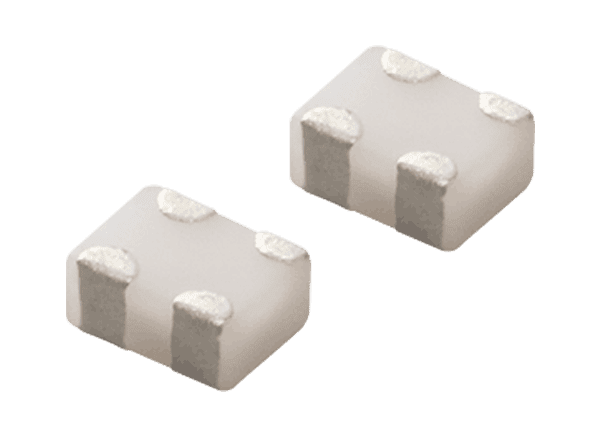
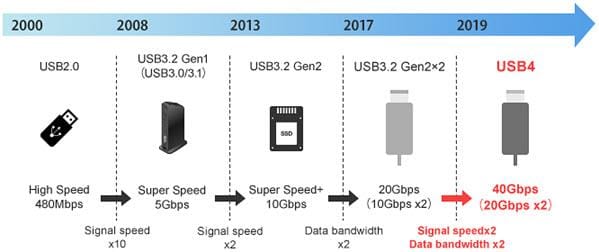
Universal Serial Bus (USB) is used worldwide as a differential interface standard for data transmission primarily between hosts, such as computers, and devices. The requirements for high-capacity data transmission over high-speed communication routes and the integration of various existing differential interface standards in the market led to the development of a new USB 4 standard in September 2019. USB 4 is expected to become widely adopted in computers and their peripherals in the coming years. Murata researched noise issues with USB communication and ways to counter that noise.
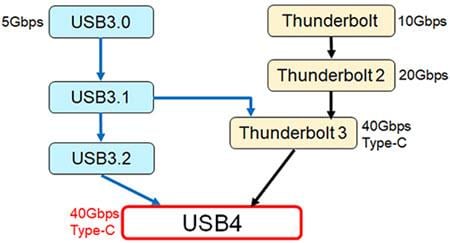
Thunderbolt™ 3 adopted the USB Type-C connector so a Thunderbolt 3 port could also be used as a USB 3.1 port. The USB 4 standard was defined for complete compatibility with Thunderbolt 3. Most of the electrical specifications for USB 4 are based on Thunderbolt 3.
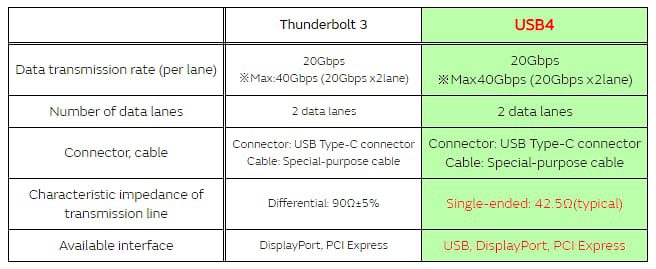
USB 4 has the same maximum data transfer speed as Thunderbolt 3. There are some slight differences in the signal amplitude and other specifications. However, the basic specifications are identical, so USB 4 will have the same noise issues arising from data signals and require the same signal quality care as Thunderbolt 3.
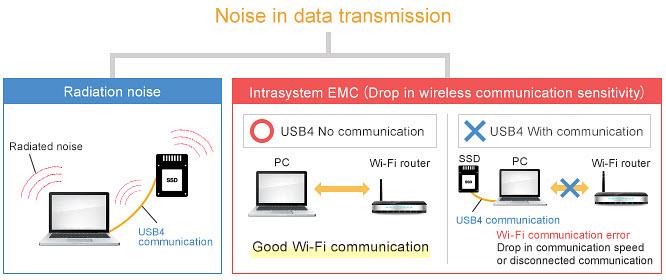
During USB 4 communication, care must be provided for two types of noise issues as shown in the diagram below. The first is radiation noise that radiates from the board or cable to the outside and affects external devices. The second is intrasystem EMC noise that interferes with other circuits inside the device, resulting in malfunctions and reduced performance.
Noise issues during USB 4 communication – 1
• Radiated emissions: Noise issues where noise radiates from USB 4 device or cable.
Noise issues during USB 4 communication – 2
• Intrasystem EMC (drop in Wi-Fi reception sensitivity): Noise issue where noise arising from data signals interferes with the Wi-Fi antenna inside the device during USB 4 communication, resulting in lower Wi-Fi communication sensitivity.
Note: Devices capable of USB 4 communication were not available as of February 2020. For this reason, Murata conducted noise assessments using devices capable of communication by Thunderbolt 3, which has virtually the same electrical characteristics as USB 4.
Effective measures for suppressing noise occurring during USB 4 communication:
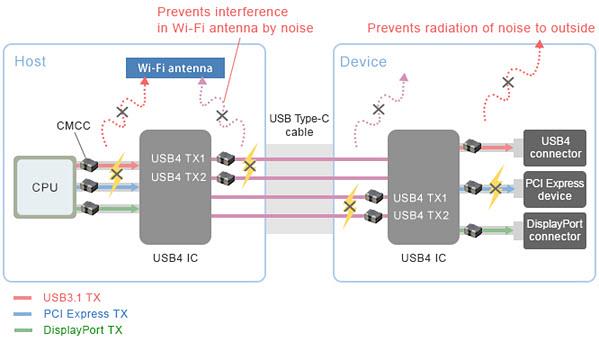
• Install common mode choke coils (CMCCs) on the differential transmission lines of the host and device.
• Place the CMCCs near the IC.
• Select the CMCC locations to prevent noise from radiating from the wires.
These key points are necessary for effective noise suppression. The simplified diagram (below) below shows an example of common mode choke coil (CMCC) installation locations for the combination of a device and a host capable of USB 4, USB 3.1 Gen 2, PCI Express, and DisplayPort communication.
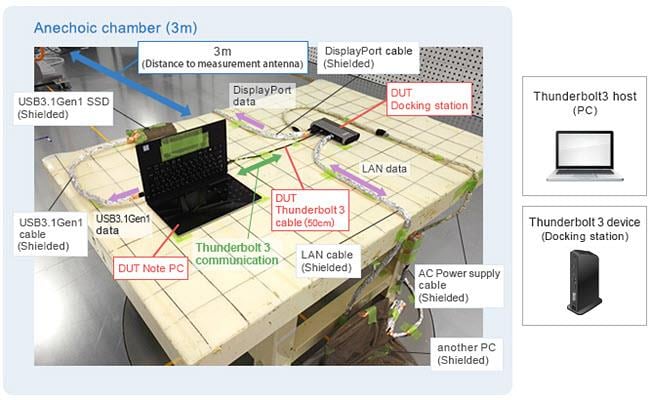
To simulate the operation status when USB 4 communication is performed within a PC, a PC was connected to a docking station capable of Thunderbolt 3, DisplayPort, Ethernet, and USB communication. The radiated noise level was measured from a distance of 3m.
To remove noise other than that from the host and device, the connection cables and all equipment except for the host and device were shielded.
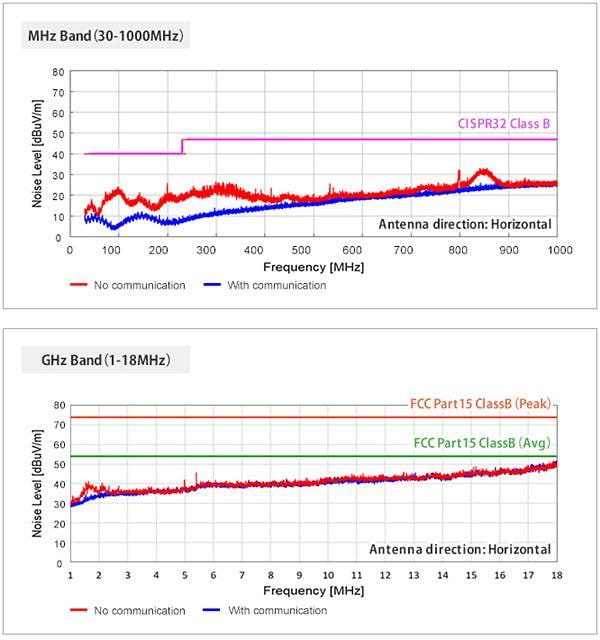
Measurement results
No noise exceeding the standard values was observed in the MHz or GHz bands. This allowed Murata to ensure sufficient margin, and Murata is highly confident that radiated emissions will not be an issue for USB 4.
Overview of DUT (Thunderbolt 3 Compatible Add-in Card)
Next, to examine the effect of intrasystem EMC, Murata conducted a noise assessment using a Thunderbolt 3 compatible add-in card in the place of USB 4. The add-in card has a Thunderbolt 3 compatible IC only.
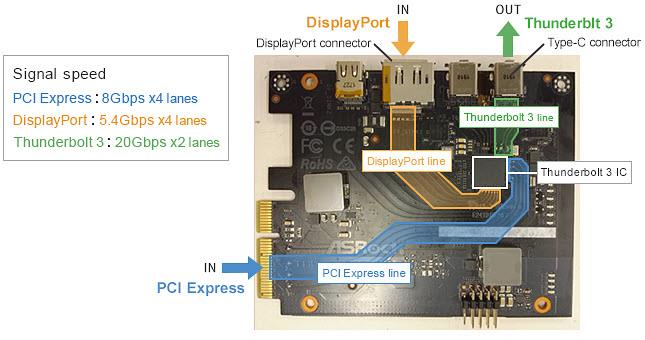
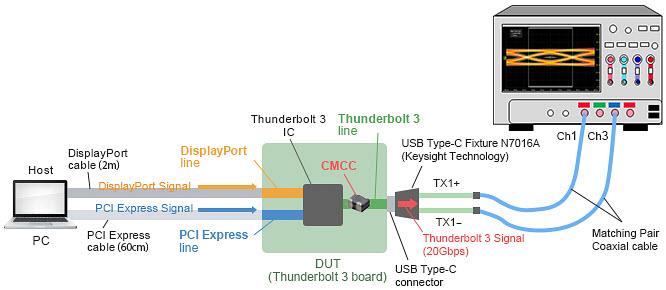
As for the configuration (Figure 1, below), the PCI Express signal (8Gbps x 4 lanes) and DisplayPort signal (5.4Gbps x 4 lanes) are input to the Thunderbolt 3 IC on the card, and the Thunderbolt 3 IC generates a Thunderbolt 3 signal (20Gbps x 2 lanes) that is output from a Type-C connector.
Assessment of Impact on Wi-Fi Reception Sensitivity
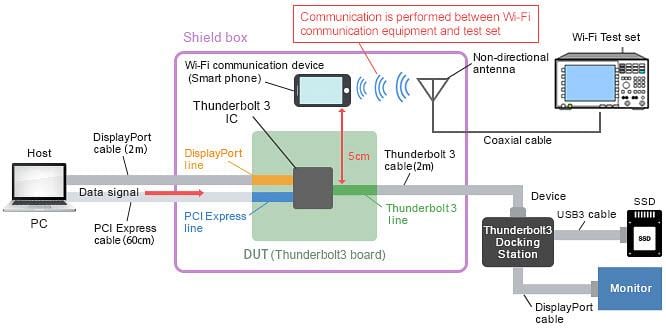
To check the impact of noise radiated from the board wires, only the DUT was housed in a shield box, and the Wi-Fi reception sensitivity of a nearby smartphone was measured (Figure 2, below).
In notebook PCs that are expected to include USB 4, there is a growing trend to install the Wi-Fi antenna on the mainboard instead of on the display, and the distance between the differential line and antenna is expected to approach around 5cm. For this reason, Murata conducted the assessment with the board wires and smartphone separated by 5cm. (This simulates the distance between the antenna and signal line inside a notebook PC.)
Measurement Results of Wi-Fi Reception Sensitivity (No Noise Suppression Measures)
Example of Wi-Fi Reception Sensitivity Assessment
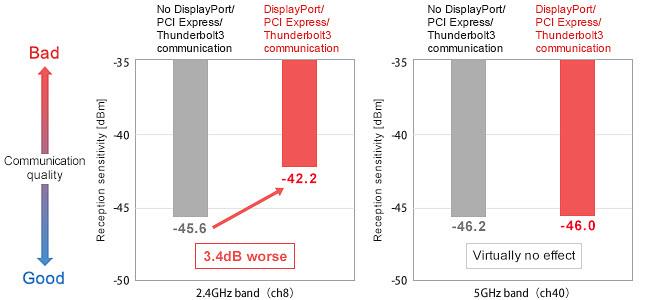
Murata examined the degree of impact on the Wi-Fi reception sensitivity by USB 4 operation (Figure 3, below).
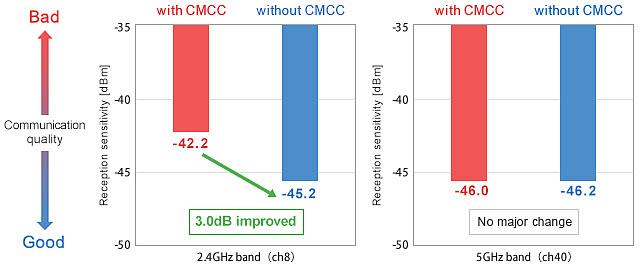
When various types of data communication were performed, the Wi-Fi (2.4GHz band) reception sensitivity level dropped by about 3dB. This was likely due to interference with the antenna by noise generated during communication. In this DUT, a drop in reception sensitivity in the 5GHz band was not found.
Assessment of Noise Entering the Antenna
Example of Assessment for Noise Entering Antenna
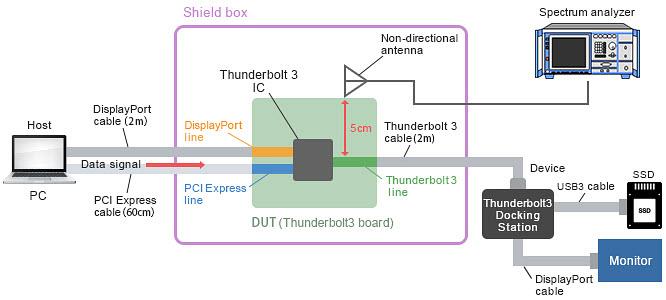
Murata then verified the level of noise entering the nearby antenna. This assessment also used a distance of about 5cm between the differential signal line and antenna.
In the configuration (Figure 4, below), a Thunderbolt 3 add-in card was used as the host, and a Thunderbolt 3 docking station was used as the device. A non-directional antenna was placed at a location that was 5cm away from the Thunderbolt 3 signal wire on the add-in cardboard. The noise radiating from the add-in cardboard was observed from the non-directional antenna. During signal communication, PCI Express, DisplayPort, and Thunderbolt 3 signals are flowing simultaneously on the add-in card.
Measurement Results for Noise Entering the Antenna (No Noise Suppression Measures)
Measurement results
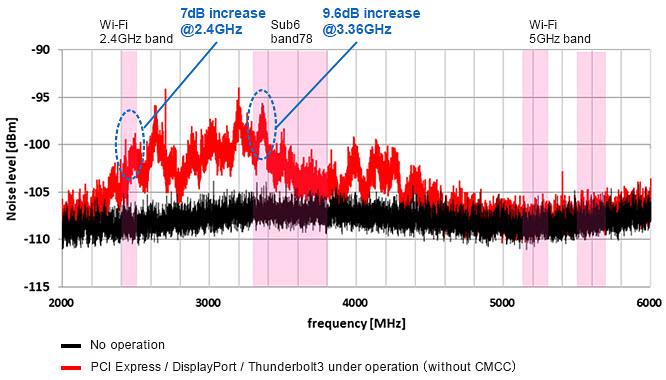
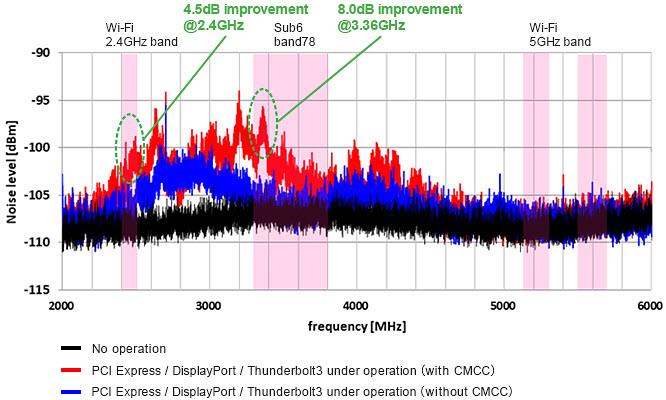
Murata determined broadband noise occurred due to DisplayPort, PCI Express, and Thunderbolt 3 communication in the 2GHz to 4.5GHz range, and this noise entered the wireless antenna (Figure 5, below).
In particular, noise occurred in the Wi-Fi communication band (2.4GHz) and sub-6 communication band (3.3GHz). This noise needs to be suppressed in order to stabilize communication.
Measurement of Near-Field Noise (No Noise Suppression Measures)
Measurement results
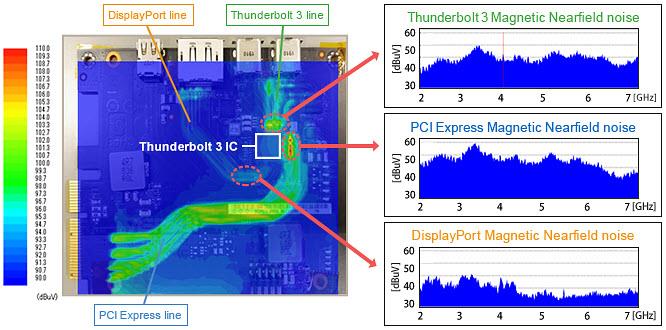
To identify the locations where noise occurred, the board was measured using an EMC tester capable of mapping the magnetic near field (Figure 6, below). By performing various types of communication, broadband noise was propagated on the Thunderbolt 3 TX signal line, PCI Express Gen3 TX signal line, and DisplayPort signal line on the add-in cardboard.
It is thought this broadband noise radiates in the space from the signal line and enters the wireless antenna. Consequently, this results in drops in Wi-Fi reception sensitivity and sub-6 reception sensitivity.
This issue is also expected to occur in USB 4, which has virtually the same electrical specifications as Thunderbolt 3.
Noise Suppression Component Insertion Location
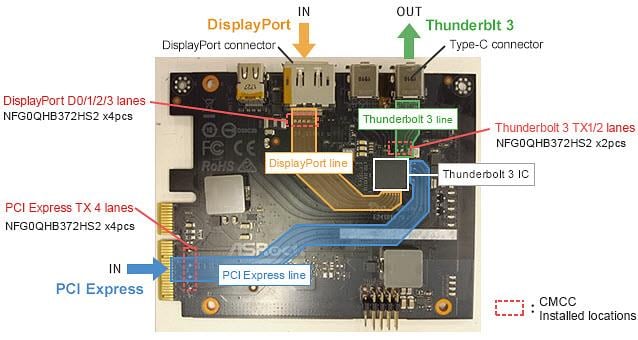
From previous assessments, Murata discovered that broadband noise radiating from the PCI Express, DisplayPort, and Thunderbolt 3 signal lines during Thunderbolt 3 communication reduced sensitivity in wireless communication.
In response, Murata installed NFG0QHB372 CMCCs on the signal lines, which were the conduction paths of the noise, for suppressing noise radiating from the wires (Figure 7, below).
Measurement Results of Reception Sensitivity (After Implementation of Noise Suppression Measures)
Measurement results
Installing NFG0QHB372 CMCCs on the signal lines (Figure 8, below) improved 3dB in Wi-Fi (2.4GHz) reception sensitivity during PCI Express, DisplayPort, and Thunderbolt 3 communication compared to usage without CMCCs.
Measurement Results for Noise Entering the Antenna (After Implementation of Noise Suppression Measures)
Measurement results
The noise entering the antenna was reduced by up to 8dB (Figure 9, below). The frequency of the entered noise must be used to select a component with specifications capable of suppressing noise in the 2.4GHz to 5GHz range.
Eye Pattern Measurement Procedure
Because a common mode choke coil is used as a noise suppression measure on the signal line, its effect on signal quality was also checked (Figure 10, below). The signal for Thunderbolt 3 was checked. A Thunderbolt 3 test pattern was output from the DUT, and the signal quality after passing through the CMCC was reviewed.
Eye Pattern Measurement
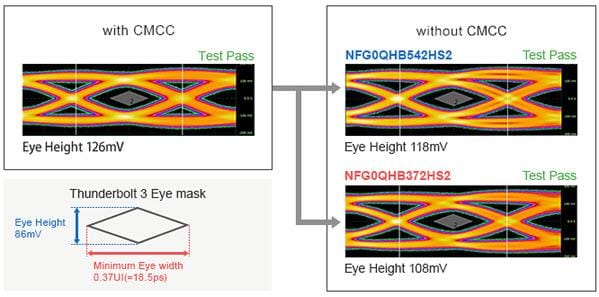
Murata examined whether the use of the common mode choke coil had any effect on signal quality. A Thunderbolt 3 test pattern was output from the DUT, and the signal quality after passing through the CMCC was checked.
Even if a common mode choke coil is used, the signal waveform quality is identical to that before the filter was inserted, and the Thunderbolt 3 compliance test was passed.
Because USB 4 also uses the same signal speed (maximum 20Gbps), the waveform test is expected to be passed.
Radiated Noise
• A USB 4 operating environment was simulated for conducting a noise assessment.
• In the 30MHz to 1000MHz and the 1GHz to 18GHz range, there was no problem with radiated noise.
Wi-Fi Reception Sensitivity
• The Wi-Fi reception sensitivity was reduced when PCI Express, DisplayPort 1.4, and Thunderbolt 3 were operating.
• Noise in the 2.4GHz band, in particular, was found from the board wires when USB 3.1 Gen 2 was operating.
• The same noise is expected to be generated during USB 4 operation.
• Use of a common mode choke coil eliminated the drop in Wi-Fi sensitivity.
Signal Quality
• Murata recommends the NFG0QHB372HS2 and NFG0QHB542HS2 Common Mode Noise Filters to implement noise suppression measures without affecting the signal quality.
Murata Community Forum provides searchable content with various discussion topics, popular blogs, and articles. The Murata broad market support team holds regular reviews to discuss open issues, allowing inquiries to be answered in a timely manner. The forum content is freely accessible to the public. However, users must log in to post questions or answers. Registration is free of charge.


